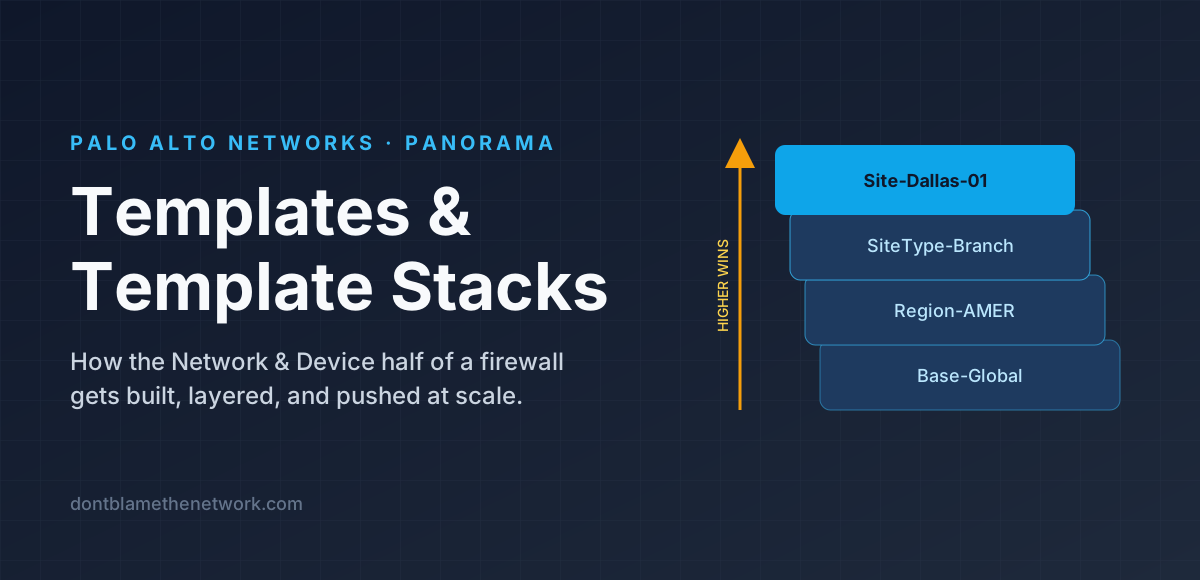
Panorama splits a firewall's configuration into two halves and manages each with a different construct. Everything about how the box is plumbed — interfaces, zones, routing, management, logging, HA — lives in Templates, delivered through a Template Stack. Everything about what traffic is allowed lives in Device Groups (covered in a companion article). Get the split right and Panorama is a joy; blur it and you spend your life chasing "why did that setting change?"
Two halves of a firewall
Open the web UI on any PAN-OS firewall and look at the tabs. Network and Device are the template half. Policies and Objects are the device-group half. Panorama simply lifts each pair of tabs out of the individual firewall and lets you author them once for many devices.
What a Template is
A Template is a reusable bundle of Network- and Device-tab configuration. You build it in Panorama under Panorama > Templates and, inside it, you see the same Network and Device tabs a firewall has. Anything you configure there can be delivered to any number of firewalls.
The important mental shift: a template is not a firewall. It has no idea which device will receive it. So you author it in the abstract — "there is an ethernet1/1 in a zone called Untrust" — and let the stack and its variables (below) supply whatever is device-specific.
Templates cannot contain policy or objects. If you find yourself wanting an address object in a template, you are in the wrong half of Panorama.
Template Stacks: layering in order
You rarely push a single template. Real fleets have settings that are truly global (NTP, syslog, admin roles), settings that vary by region (DNS, time zone), settings that vary by role (a branch has two interfaces, a data-center edge has twelve), and a few that are unique to one site. Rather than one giant template per firewall, Panorama lets you combine up to eight templates into an ordered Template Stack, and it is the stack, not the template, that a firewall is assigned to.
The precedence rules
When Panorama computes the configuration a firewall will actually receive, it merges the stack from the bottom up and applies these rules:
- Templates higher in the stack override templates lower in the stack for any setting both define.
- Settings defined in only one template pass through untouched — the stack is a union, not a replacement.
- In recent PAN-OS releases you can also configure values directly on the stack; those sit above every member template.
- A local override made on the firewall itself beats everything Panorama sends (until an admin reverts it or forces template values — see below).
Variables: one template, many firewalls
Layering solves "settings that differ by group." It does not solve "settings that differ per device" — the management IP, the uplink address, the BGP ASN, the HA priority. Duplicating a template per site to carry one IP address would defeat the point.
Template variables (PAN-OS 8.1 and later) solve this. Inside a template you type a placeholder that begins with a dollar sign — $MGMT_IP, $UPLINK_IP, $BGP_ASN — wherever a device-specific value belongs. Then, in the template stack, you give each firewall its own value for each variable. Panorama substitutes at push time.
Variables are typed. Common types include IP address/netmask, IP range, FQDN, interface, AS number, HA group ID and device priority, QoS profile, and egress maximum. Panorama validates the value against the type before it will push, which catches a surprising number of typos.
Overrides on the firewall
Settings that arrive from Panorama appear on the firewall as read-only: you can see them, but the field is locked. If an engineer needs to deviate — say, during an outage — they click Override, which creates a local copy of that one setting that takes precedence over Panorama's value.
Two things bring the firewall back into line:
- Revert to Template on the firewall, which deletes the local copy.
- Force Template Values checked during a Panorama push, which wipes all local overrides on the targeted devices.
Overrides are an operational escape hatch, not a design pattern. If a value has been overridden on the same box for three months, that value belongs in a template (or a variable).
A layering strategy that survives growth
| Stack position | Template | Owns | Rule of thumb |
|---|---|---|---|
| Top (1) | Site-specific | Anything truly unique to that one location | Exists only if needed; should be nearly empty |
| 2 | Role | Interface layout, zones, virtual routers, GlobalProtect for that class of device | One per firewall role: Branch, Campus, DC-Edge, Internet-Edge |
| 3 | Region / Environment | DNS, NTP peers, time zone, regional log collectors | One per region or per prod/non-prod split |
| Bottom (4) | Base-Global | Admin roles, authentication profiles, login banner, baseline log settings, SNMP | Applies to every firewall you own |
Four layers is plenty for most organisations. The cap is eight, but every extra layer is another place a conflicting value can hide.
Commit and push
Changing a template does nothing to any firewall until two things happen:
- Commit to Panorama — saves your edits to Panorama's own running configuration.
- Push to Devices — select the template stacks (and/or device groups) to deliver. Panorama merges each stack, substitutes variables, validates the result, and pushes a per-device configuration that the firewall then commits locally.
The push dialog has two options worth understanding. Merge with Device Candidate Config keeps any uncommitted local changes on the firewall instead of discarding them. Force Template Values is the override eraser described above. Use the second one deliberately.
Common mistakes
- The same setting in two templates, by accident. The higher one silently wins and nobody notices until the lower one is edited and "nothing happens." Keep each setting in exactly one layer.
- One template per firewall. Technically works; operationally it is just distributed manual configuration. Layers and variables exist to prevent this.
- Hard-coded IPs in a shared template. The first time you add a second site you will fork the template. Use a variable from day one.
- Overrides left in place. They make the firewall lie about what Panorama thinks it has. Audit them; fold them back into templates.
- Policy in the wrong half. Zones are template-side; the rules that reference zones are device-group-side. Panorama's Reference Templates setting on a device group lets policy dropdowns see the stack's zone names so the two halves line up.
Quick verification
On the firewall, see exactly what Panorama delivered:
admin@FW-Dallas> show config pushed-templateOn Panorama, list what exists:
admin@Panorama> show templates
admin@Panorama> show template-stack
In the GUI, Panorama > Templates shows each stack, its member order, and which devices are assigned; the per-device variable table lives under the stack's Manage Variables action.
Key takeaways
Templates hold Network- and Device-tab configuration and never contain policy. A Template Stack is an ordered list of up to eight templates; a firewall is assigned to one stack, and higher templates win on conflicts. Variables ($NAME) make one template serve many devices. Local overrides beat Panorama until reverted or forced. Layer specific-on-top, generic-on-bottom, and keep every setting in exactly one place.
Found it useful, spotted a mistake, or done it differently? Start a thread. The link and title are filled in for you; Reddit will ask you to confirm before it posts.